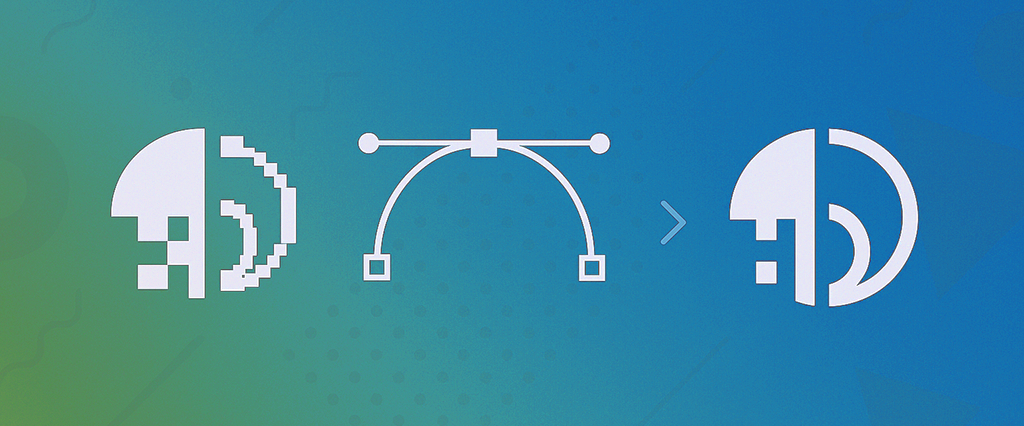
So you’ve just created a logo using ChatGPT with DALL-E, Midjourney, Canva’s AI logo maker, or maybe Looka, Renderforest, LogoAI, or one of the dozens of shiny new AI tools popping up faster than you can say “artificial intelligence.”
Congratulations! You’ve got a design that looks pretty awesome on your screen. Your brand has a face. You feel like a creative genius. Life is good.
But here’s the plot twist nobody tells you about: Your AI-created logo isn’t actually ready for the professional world yet.
I know, I know, that’s a buzzkill, right? But stick with me here, because understanding what’s missing (and how to fix it) is the difference between looking like a startup and looking like a successful startup.
The AI Logo Revolution (And Its Dirty Little Secrets)
Let’s give credit where it’s due: AI has absolutely revolutionized logo creation. What used to cost $500 to $2,000 and take weeks of back-and-forth with designers now happens in minutes for $20 (or free if you’re clever). That’s genuinely amazing.
AI logo tools excel at:
- Lightning-fast concept generation (dozens of options in seconds)
- Creative exploration you might never have imagined
- Breaking through “blank canvas” paralysis
- Getting something up and running when you’re bootstrapping
But, and this is a big but, they also come with some sneaky limitations that most people discover at the worst possible moment. Like when you’re trying to print business cards. Or launch that billboard campaign. Or, you know, actually use your logo professionally.
The 5 Hidden Problems with AI-Generated Logos
1. The Legal and Ownership Question
Here’s something important to understand upfront: the legal landscape around AI-generated logos is evolving, and the rules are still being clarified by courts and the U.S. Patent and Trademark Office (USPTO).
What we know for certain:
- The USPTO has not banned AI-generated logos from trademark registration
- Trademarks do NOT require human authorship to be registered (unlike copyright)
- What matters for trademark registration is whether the logo is distinctive, original, and actively used in your business
- The USPTO does require that a human person or legal entity owns the trademark, not the AI tool itself
What’s still uncertain:
- Whether AI-generated logos might inadvertently incorporate patterns similar to copyrighted works the AI was trained on
- How courts will ultimately rule on questions of AI-generated content and intellectual property
- How thoroughly the USPTO will examine AI-generated logos for potential conflicts with existing trademarks
Here’s the bottom line: Trademarking an AI logo is legally possible today, but it requires careful attention. You should conduct a thorough trademark search to ensure your design doesn’t conflict with existing marks, and many legal experts recommend consulting with a trademark attorney before filing an application.
It’s not that AI logos can’t be trademarked. It’s that the legal questions are complex enough that you absolutely need professional legal advice before assuming your AI logo has full trademark protection.
2. The Format Snag (Pixels vs. Vectors)
Most AI tools spit out PNG or JPG files. These are raster images, which means they’re made of pixels. They look fantastic on your screen at the size they were created.
But try to blow them up for a trade show banner or shrink them down for a business card, and suddenly your sleek logo looks like it was designed on an Etch A Sketch after a few drinks.
Why? Because raster images are resolution-dependent. That 1,000 by 1,000 pixel logo has exactly 1,000,000 pixels to work with. Stretch it to twice the size, and those same pixels have to cover four times the area. Math is cruel.
Vector graphics, on the other hand, use mathematical formulas instead of pixels. Scale them to the size of a postage stamp or a billboard, and they stay crisp and sharp. (Learn the technical details in “What Is a Vector Logo?”)
3. The Text Rendering Disaster
If your AI logo includes text, company name, tagline, anything with actual letters, take a close look. Really close.
See those slightly wonky letterforms? The spacing that’s juuust a bit off? Maybe some letters that look vaguely right but aren’t actually real fonts?
AI tools are notoriously terrible at text generation. They can create beautiful imagery, but when it comes to typography, they’re still learning their ABCs. Sometimes literally, you’ll get gibberish letters that look font-ish but aren’t actual characters.
This matters because:
- Printers need actual fonts (or outlined text paths) to reproduce your logo accurately
- Inconsistent letterforms look unprofessional up close
- You can’t edit or update text that’s actually just a jumbled image
4. Editing Is Nearly Impossible
Let’s say six months from now you want to tweak your logo’s color. Or adjust the spacing. Or update your tagline. Or create a simplified version for your social media profile picture.
With an AI-generated PNG file? Good luck. You’re basically starting over.
AI-generated designs typically have:
- Uneven line weights (some lines thick, some thin, no rhyme or reason)
- Odd spacing and alignment issues
- Fragmented elements merged into one flattened image
- No editable layers or components
- Embedded gradients and effects that can’t be separated
Some people try auto-trace tools to convert their PNG to vector. These tools analyze your pixelated image and try to create vector paths. The result? Usually a janky mess of overlapping shapes, jagged edges, and bloated file sizes that crash design software. (See more in “How to Convert My Logo to Vectors“)
5. The Professional Compatibility Problem
Here’s a scenario: You’ve landed a huge opportunity, a retail store wants to carry your product. Amazing! They just need your logo in EPS format for packaging.
You: “What’s EPS?”
Them: “It’s a standard vector format. Your designer should have it.”
You: “I used an AI tool…”
Them: “So you don’t have vector files?”
You: (nervous sweating)
Professional printers, sign makers, embroiderers, promotional product companies, and graphic designers all work with vector files. Specifically, they need formats like:
- EPS (Encapsulated PostScript)
- AI (Adobe Illustrator)
- PDF (vector, not just any PDF)
- SVG (Scalable Vector Graphics)
If you only have a PNG, you’re not in the game. You’ll either lose the opportunity, pay rush fees for someone to recreate your logo, or end up with inferior quality because they had to “make do” with what you sent.
Why Professional Vector Conversion Changes Everything
Okay, enough doom and gloom. Let’s talk about the solution, and why it’s not as complicated or expensive as you might think.
Professional vector conversion (also called vectorization or logo tracing) transforms your AI-generated bitmap into a scalable, editable, industry-standard vector file. But it’s not just running it through an auto-trace tool and calling it a day.
Here’s what actually happens:
A real human designer (with, you know, eyeballs and design experience) manually recreates your logo using professional vector software like Adobe Illustrator or CorelDRAW. They:
- Clean up the design. Evening out line weights, fixing spacing, aligning elements properly
- Refine typography. Matching text to actual professional fonts (or creating custom letterforms with proper vector paths)
- Optimize for scalability. Ensuring every element looks perfect at any size
- Remove artifacts. Eliminating the digital “noise” and compression artifacts from AI generation
- Prepare print-ready files. Creating proper outlined fonts, and appropriate bleed areas
- Deliver multiple formats. Providing the comprehensive file package you need for every application
Understanding the importance of vector logos for memorable brands becomes crucial here. Professional vector files give you:
✓ Perfect scalability. Business card to billboard without quality loss
✓ True editability. Change colors, adjust elements, create variations
✓ Industry acceptance. Work seamlessly with any professional vendor
✓ Future-proof design. Adapt to new applications and technologies
✓ Professional credibility. Your brand looks as legitimate as it actually is
What You’ll Actually Get (The File Package Breakdown)
When you get your logo professionally vectorized, you shouldn’t just receive “a file.” You should get a comprehensive package that covers every possible use case:
EPS Files (Encapsulated PostScript)
The gold standard for professional printing. Works with virtually any design software. Preserves perfect quality for commercial printing, signage, and promotional products. What printers ask for first.
SVG Files (Scalable Vector Graphics)
Ideal for websites and digital interfaces. It’s a lightweight format that loads fast and stays perfectly sharp at any size, making it perfect for responsive logos and icons.
Vector PDF Files
Easy to share with anyone, everyone can open PDFs. Maintains full vector scalability. Perfect for email, presentations, and client sharing. Can be opened and edited in Adobe Illustrator.
High-Resolution PNG Files
Optimized for digital use (website, social media, email signatures). Transparent backgrounds for flexible placement. Multiple sizes for different applications. Appropriate resolution for sharp screen display.
Want to dive deeper into the technical side? Check out “What Is a Vector File Format?” and “How to Open and Use a Vector File” to understand exactly what you’re working with.
Real-World Scenarios Where Vector Files Save Your Business
Let me paint you some pictures of when you’ll be really glad you invested in professional vectorization:
Scenario 1: The Trade Show Opportunity
You get accepted to a major industry trade show (congrats!). You need a 10-foot backdrop banner, table throw, business cards, and promotional materials. The vendor asks for your logo in vector format. You send it over confidently. Your booth looks amazing. You close deals. Life is good.
Scenario 2: The Retail Partnership
A boutique wants to carry your product. They need your logo for packaging, in-store displays, and their website. You provide EPS files for print and SVG (Scalable Vector Graphics) for web. Everything reproduces perfectly. Your product flies off shelves. You expand to 10 more stores.
Scenario 3: The Apparel Launch
You decide to create branded merchandise, t-shirts, hats, tote bags. The screen printer needs vector files. The embroidery shop needs a simplified vector version. You have both. Your merch looks professional and becomes a revenue stream.
Scenario 4: The Rebrand Evolution
Three years in, your brand has grown. You need to update your tagline and adjust your color palette. Because you have editable vector files, this takes your designer much less instead of starting from scratch. You maintain brand continuity while evolving professionally.
The Smart Approach: AI + Human Expertise
Here’s the thing: AI logo generators aren’t bad. They’re actually revolutionary tools that democratize design and spark creativity. The problem is treating them as the finish line instead of the starting line.
Think of AI as your brainstorming partner, helping you explore possibilities, test concepts, and visualize ideas faster than ever before. Then think of professional vectorization as your production partner, taking that creative concept and making it actually work in the real world.
The winning formula:
- Explore creatively with AI tools (fast, affordable, inspiring)
- Select your direction based on what resonates with your brand
- Execute professionally with human vectorization (scalable, editable, legitimate)
- Deploy confidently across all your business applications
You get innovation and professional execution. Creative freedom and technical excellence. Fast iteration and lasting quality.
It’s not either/or. It’s both/and.
How to Know If Your Current Logo Needs Professional Vectorization
Not sure if your logo needs the vector treatment? Ask yourself these questions:
- Do you only have PNG, JPG, or other raster files?
- Does your logo look fuzzy or pixelated when you zoom in closely?
- Has a printer or vendor ever asked you for “vector files” that you couldn’t provide?
- Is your logo an image that looks like letters?
- Can you change colors easily, or is everything baked into one flattened image?
- Do you plan to print business cards, signage, apparel, or promotional materials?
- Would you like to create variations (simplified, icon-only, alternate colors)?
- Do you want your brand to look as professional as your competitors’?
If you answered “yes” to even 2 to 3 of these questions, professional vectorization will directly impact your business success.
A Word About Trademarks and AI Logos
Here’s something important that you need to understand: The trademark question with AI logos is still evolving, and laws are still being clarified.
According to recent guidance from the USPTO (U.S. Patent and Trademark Office) and trademark attorneys:
What we know for certain:
- AI-generated logos can potentially be trademarked if they meet basic requirements (distinctive, not conflicting with existing marks, actively used in commerce)
- The USPTO does not have a blanket ban on AI-generated trademarks
- Trademark registration does NOT require human authorship (unlike copyright protection)
- What matters is whether the mark functions as a distinctive identifier in commerce
Important caveats:
- AI tools are trained on existing designs, which creates a risk that your AI logo might accidentally resemble existing trademarks. This could result in your trademark application being rejected.
- An AI tool might have incorporated patterns or elements based on copyrighted works, creating potential legal conflicts
- The law in this area is still evolving, with courts and the USPTO continuing to clarify how AI-generated content should be treated
Here’s the practical advice: If trademark protection is important to your business (and it probably should be), consult with a trademark attorney. They can:
- Conduct thorough trademark searches to ensure your design doesn’t conflict with existing marks
- Advise on your specific situation and risk factors
- Help you properly document your logo’s creation and ownership
- Guide you through the trademark registration process
We’re here to make sure your logo is technically excellent and professionally executed. The legal strategy and trademark questions? That’s between you and your attorney.
What Professional Vectorization Actually Costs (Hint: Way Less Than You Think)
Here’s where people often get sticker shock, until they understand what they’re comparing.
Traditional graphic designer logo creation: $500 to $2,000 and higher (and 2 to 4 weeks)
Professional logo vectorization: $89 to $150 (and 24 to 48 hours)
You’ve already done the creative heavy lifting with your AI tool. You’ve explored concepts, iterated on designs, and landed on something you love. You don’t need to pay for that again.
You just need someone with 20 plus years of design experience to take your concept and execute it with professional precision, clean vector paths, proper typography, print-ready specifications, and comprehensive file formats.
That’s exactly what VectorYourLogo.com provides. Hand-crafted vectorization (not automated tools), fast turnaround, and all the file formats you need to run your business professionally.
Think about it this way: You’re about to order 500 business cards ($150), or print promotional materials ($300 and higher), or invest in a website redesign ($2,000 and higher). Those investments are wasted if your logo looks fuzzy, unprofessional, or can’t be reproduced properly.
Spending $89 to ensure your logo works perfectly everywhere is the smartest $89 you’ll spend on your brand. Full stop.
Your Next Move: From Good Enough to Actually Professional
AI gave you a fantastic starting point. You’ve got creative direction and visual identity. That’s genuinely valuable, and it happened in a fraction of the time and cost of traditional design processes.
Now it’s time to make it real. To make it work. To make it professional.
Your brand deserves to look legitimate at every touchpoint, from your Instagram profile to your trade show booth, from your business card to your future retail packaging. Don’t let technical limitations hold back your business growth.
Whether you created your logo with ChatGPT, Midjourney, Canva, Looka, or any other AI tool, professional vectorization is the bridge between creative concept and business asset.
Take Your AI Logo to the Professional Level
Ready to transform your AI-generated logo into a true professional asset that works everywhere your business needs it?
Get your logo vectorized at VectorYourLogo.com
You’ll receive:
✓ Hand-crafted vector precision (no automated tools)
✓ Industry-standard EPS, SVG, PDF, and PNG files
✓ Professional-quality execution by 20 plus year design expert
✓ Fast turnaround
✓ Files with clear human authorship
✓ Fixed $89 pricing, no surprise fees or hourly charges
Your logo is the face of your business. Make sure it’s ready for everything that comes next.
When you’re ready to take your brand seriously, your logo needs a professional vector master file that works everywhere, from social media avatars to 10 foot banners, from embroidered apparel to retail packaging.
VectorYourLogo.com was created specifically to help entrepreneurs and small businesses convert AI-generated concepts into professional vector files, without paying those crazy $500 to $2,000 designer fees for work you’ve essentially already done.
Send your logo today and give your brand the scalable, professional foundation it deserves.

When your logo needs to do more than sit on a screen, it needs a vector master that works everywhere. VectorYourLogo.com exists to turn your current logo into a clean, professional vector file without high designer rates.
Send your logo and get it ready for print, signs, web, and anything else your business needs.
- Mario Vargas