
So you’ve heard someone say, “You need a vector logo.” Or maybe a printer asked you for an “EPS file.” Or perhaps you uploaded your logo somewhere and got rejected because your file wasn’t “vector.”
If those statements made your eyes glaze over a little bit, don’t worry. You’re about to understand exactly what vector logos are, why they matter for your business, and why having one is one of the smartest decisions you can make for your brand.
Let’s start with the simple explanation, then we’ll go deeper.
What Exactly is a Vector Logo? (The Simple Version)
A vector logo is a digital file that uses mathematical formulas (not pixels) to create your logo design. Think of it as drawing your logo with precise geometric instructions instead of coloring pixels on a canvas.
Here’s the key difference: A vector logo can scale to any size without losing quality. Your logo will look perfect on a business card or on a 20-foot billboard. It’s impossible to do that with regular image files.
That’s it. That’s the core concept. Everything else flows from this one magical property.
Now let’s understand how this actually works.
How Vector Graphics Actually Work
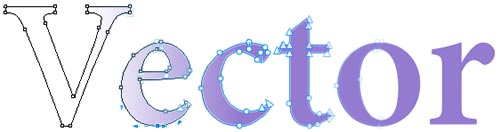
Instead of storing information as “pixel at position X has color Y,” vector graphics store information as mathematical instructions.
Here’s a practical example:
- Bitmap (raster) image: “Put a red pixel at position 100,200”
- Vector graphic: “Draw a straight line from point A at (100,200) to point B at (300,400) with 2-pixel thickness and red color”
See the difference? One is “here’s a specific color dot.” The other is “here’s a shape with specific characteristics.”
Vector graphics use:
- Points and lines to create shapes (connected using straight or curved paths)
- Mathematical coordinates to define precise positions
- Attributes like stroke thickness, fill color, opacity, and more
The result? A scalable, editable, flexible design that stays sharp at any size.
Fun fact: The typeface you’re reading right now is vector-based. Every letter in every email you write is drawn from vector instructions. That’s how flexible and powerful this technology is. (If you want to dive deeper into how different vector formats work, check out our guide on what is a vector file format.)
Vector vs. Raster: What’s the Difference (And Why It Matters)
This is the critical comparison that explains why vector logos are essential for business.
Raster Images (Also Called Bitmap)
Raster images are made of pixels. Picture a grid where each tiny square has a color. Millions of colored squares create the image.
The problem:
- Fixed resolution. If an image is 100 pixels by 100 pixels, it has 10,000 pixels total
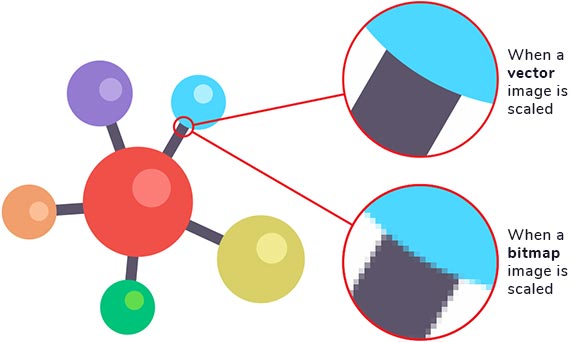
- Make it bigger? The software has to invent new pixels to fill the space, causing blurriness
- Make it smaller? The software has to remove pixels, causing loss of detail
- Large file sizes, especially for detailed images
- Not ideal for scaling to different sizes
Real example:
Your logo is 100 by 100 pixels (perfect for a website). But now you need it for a social media profile picture that requires 360 by 360 pixels. That’s 260 additional pixels per side. The software tries to fill in those missing pixels by guessing what color they should be. The result? Your crisp, sharp logo now looks fuzzy and blurry. This is exactly why understanding the importance of vector logos for a memorable brand is so critical for business success.
Vector Images
Vector images use mathematical formulas instead of pixels. Scale them up or down, and the formulas recalculate. The result is always crisp and sharp.
The advantage:
- Scalable to any size without quality loss
- Small file sizes (mathematical instructions take up less space than millions of pixel values)
- Easy to edit and modify
- Can be converted to any other format
- Resolution independent
Real example:
Your vector logo stays sharp whether it appears in a 16-pixel favicon on a website or a 10-foot vinyl banner. The same mathematical instructions create perfect quality at any size.
Real-World Scenarios Where Vector Logos Make a Difference
Let me show you specific situations where having a vector logo becomes absolutely critical:
Scenario 1: Printing Business Cards
You’ve got a beautiful raster logo that looks perfect on your website. You want to print 500 business cards. The printer asks for a vector file.
If you only have raster: You scramble to find someone to recreate your logo in vector format, paying rush fees and hoping it looks similar. Or you submit the raster file, hoping it prints okay. It doesn’t. Your cards look unprofessional.
If you have vector: You send the EPS file. It prints perfectly at any size. Professional, crisp, exactly what you want.
Scenario 2: Large Format Signage
Your business is doing well. You want a vinyl banner for your storefront. The sign shop needs a vector file because they’re printing at a massive scale.
If you only have raster: A 300-pixel logo blown up to 6 feet wide looks terrible. Pixelated, blurry, amateur.
If you have vector: Crystal clear quality, no matter the size. Your sign looks professional.
Scenario 3: Rebrand or Logo Update
Three years later, you want to change your logo’s colors or adjust the design slightly. Maybe you’re adding a new tagline or simplifying the design.
If you only have raster: You hire a designer to recreate your logo from scratch. Cost: $500 to $2,000. Time: several weeks.
If you have vector: A designer opens your vector file, makes adjustments in minutes, and you have both the old and new versions. Cost: minimal. Time: same day. Learn more about the different ways to convert your logo to vectors if you’re starting with a raster file.
Scenario 4: Multiple Applications
Your brand is expanding. You need your logo in different formats:
- For your website (web-friendly PNG and SVG)
- For print materials (EPS and PDF)
- For embroidery on promotional products (simplified vector version)
- For your email signature (optimized PNG)
- For social media profiles (square PNG files)
If you only have raster: You have to recreate your logo multiple times in different formats, each looking slightly different.
If you have vector: You convert your master vector file once to all the formats you need. Everything is consistent, professional, and perfectly rendered in each format.
The Most Important Vector File Formats (You Only Need to Know Two)
There are many vector file formats, but for your logo, you really only need to understand two:
EPS (Encapsulated PostScript)
EPS is the gold standard for professional printing. Every printer, sign maker, and design professional recognizes this format.
Why it matters:
- Universal acceptance across all professional printing services
- Maintains quality perfectly when printed
- Can be imported into any design software
- Industry standard for logos sent to vendors
When you need it: Whenever you’re working with a printer, sign shop, or professional vendor.
SVG (Scalable Vector Graphics)
SVG is the web standard for vector graphics. If your logo needs to appear on websites, email, or digital platforms, SVG is ideal.
Why it matters:
- Native web format (loads faster than raster images)
- Scalable for responsive design (looks perfect on any device)
- Accessible and SEO-friendly
- Can be styled with CSS if needed
When you need it: For your website, digital marketing materials, and online applications.
Other Formats You Might Encounter
AI (Adobe Illustrator), CDR (CorelDRAW), and PDF also exist as vector formats, but they’re not as universally accepted. If someone asks for one of these, it’s usually because they’re using that specific software.
The rule: When in doubt, ask for EPS or SVG. These two formats will cover 99 percent of your needs. For a complete breakdown of all vector file formats and when to use each one, read our comprehensive guide on vector file formats.
The Software That Creates and Edits Vector Files
You don’t need to create vector logos yourself, but it’s helpful to know what software works with them:
Professional Grade (Industry Standard)
Adobe Illustrator
- The most widely used design software
- Industry standard across design and printing
- Cost: $54.99 per month (subscription)
- Steep learning curve, but incredibly powerful
CorelDRAW
- Powerful vector design software
- Popular in Europe and among print professionals
- Cost: One-time purchase or subscription
- More intuitive for some users than Illustrator
Budget-Friendly and Free Options
Affinity Designer
- Professional-grade tool at a fraction of Adobe’s cost
- Excellent for small businesses and freelancers
- No subscription required
Inkscape
- Completely free and open-source
- Surprisingly powerful for the price
- Steeper learning curve, but great for occasional users
- No licensing fees, ever
The good news: You don’t need to learn these programs. That’s exactly what professional vectorization services (like VectorYourLogo.com) are for. You focus on your business, and professionals handle the technical vector work. If you already have a vector file but aren’t sure how to work with it, our guide on how to open and use a vector file will walk you through everything.
Why You Absolutely Need Your Logo in Vector Format
Let’s get specific about why this matters so much for your business:
Scalability Without Compromise
Print your logo on a business card or a building. It stays sharp at both sizes. Try that with a regular image file.
Easy Editing and Updates
Need to change your company colors? Adjust spacing? Create a simplified version for social media? Vector files make these changes fast and simple.
Industry Compatibility
Printers, sign makers, embroiderers, promotional product companies, web designers, and marketing agencies all work with vector files. If you only have raster images, you’re creating friction and delays in every interaction.
Professional Credibility
When you hand a vector file to a vendor, you immediately signal that you’re professional and organized. When you hand them a PNG and say “It’s all I have,” you look unprepared.
Future-Proofing Your Brand
Your vector logo will work with technology that doesn’t even exist yet. Raster images? They degrade and become obsolete. Vector files are timeless.
Cost Savings Over Time
Yes, professional vectorization costs $89 to $150 upfront. But consider:
- Designer fees to recreate your logo: $500 to $2,000
- Reprinting materials because the file quality was bad: $200 to $1,000
- Vendor rush fees for file conversion: $50 to $300 per vendor
- Lost business opportunities because you couldn’t provide proper files: priceless
Professional vectorization pays for itself the first time you need to print or share your logo professionally.
The Complete Logo File Package You Should Have
Here’s what your ideal logo asset collection looks like:
Master Files
EPS (Vector)
Primary master file for professional printing and vendor work
SVG (Vector)
Master file for web and digital applications
Print Files
PDF (Vector)
Easy to share and print, works on any system
High-Resolution PNG (Raster)
Backup for digital use, transparent background
Digital Files
PNG Files (Multiple Sizes)
Different dimensions for website, social media, email signatures
Favicon PNG
16×16 and 32×32 pixels for browser tab icons
Social Media Files
Square PNG Files
Various dimensions: 200×200, 400×400, 1000×1000 pixels
Logo Variations
Horizontal, vertical, icon-only, and simplified versions
Different Color Versions
Primary colors, white (for dark backgrounds), black (for light backgrounds)
A professional vectorization service should provide most of these files when they vectorize your logo.
Common Questions About Vector Logos
Can I convert my raster logo to vector myself?
Technically, yes. Auto-trace tools exist (Illustrator has one, free tools like Potrace exist). But they rarely produce professional results. You’ll typically get jagged edges instead of smooth curves, bloated file sizes, poor text quality, and overlapping shapes that are hard to edit. We cover the pros and cons of different conversion methods in our article about how to convert your logo to vectors. It’s usually worth paying a professional to do this correctly.
Is my logo copyright protected if it’s in vector format?
Vector format doesn’t change copyright law. Your original logo is copyrighted whether it’s raster or vector. Vector format is just the technical representation. (For legal questions about copyright and trademark, consult with an attorney.)
Can I open a vector file in Photoshop or Paint?
Technically, yes. But here’s the problem: Those programs convert the vector to raster (pixels) in the process. You lose the scalability advantage. It’s like buying a vehicle and then storing it in a garage so small you have to deflate the tires.
Always open vector files in vector software (Illustrator, CorelDRAW, Inkscape, etc.) to maintain quality.
My logo is currently just a JPG. Is it too late to get a vector version?
Not at all! That’s exactly what professional vectorization services do. A designer will manually recreate your logo as a vector from your JPG file. This is one of the most common requests in the design industry.
How long does it take to vectorize a logo?
Professional services typically deliver within 24 to 72 hours
What makes a good vector logo?
The best vector logos share these characteristics:
- Simple enough to recognize at any size
- Works in both color and black and white
- Doesn’t rely on gradients or photorealistic effects
- Uses clear, professional fonts
- Has consistent line weights
- Works as a small icon and a large sign
I created my logo with an AI tool. Do I still need it vectorized?
Absolutely! AI logo generators like ChatGPT, Midjourney, and Canva typically output PNG or JPG files (raster images). While these look great on screen, they’re not suitable for professional printing, signage, or scalable applications. Professional vectorization converts your AI-generated concept into a proper vector format that works everywhere. Read our complete guide: I created my logo with AI, now what?
Vector Logos and Your Brand’s Future
Think of your vector logo like your brand’s master blueprint. It’s the source file from which everything else flows.
Every business card, every sign, every website, every email signature, every piece of promotional material, every social media profile. All of it stems from your vector logo.
If your master file is raster (low quality, non-scalable), you’re building your entire brand on a weak foundation. Every application suffers.
If your master file is vector (scalable, professional, flexible), you’ve got a solid foundation that grows with your business.
Ready to Get Your Logo in Professional Vector Format?
If you’ve got a logo that’s currently in JPG, PNG, or any other raster format, professional vectorization is simpler and more affordable than you think.
At VectorYourLogo.com, here’s what you get:
- ✓ Hand-crafted vector precision (no automated tools that produce jagged results)
- ✓ Multiple file formats (EPS, SVG, PDF, PNG, and variations for different uses)
- ✓ Professional quality from 20 plus years of design experience
- ✓ Fast turnaround
- ✓ Fixed $89 pricing (no surprise fees)
- ✓ A master vector file you can use forever for any application
Your logo is too important to your brand to be stuck in a low-quality raster format. Whether you created your logo with an AI tool, a designer, or you drew it yourself, professional vectorization ensures it’s ready for any opportunity.
Get your logo vectorized today and stop worrying about file formats. You’ll have a professional master file that works everywhere.
Your brand deserves a vector logo. Let’s make it happen.

When your logo needs to do more than sit on a screen, it needs a vector master that works everywhere. VectorYourLogo.com exists to turn your current logo into a clean, professional vector file without high designer rates.
Send your logo and get it ready for print, signs, web, and anything else your business needs.
- Mario Vargas